At a glance
- What it is: Wi-Fi 7 is a wireless networking generation introduced in 2024.
- What’s new: It enhances performance across the 2.4 GHz, 5 GHz, and 6 GHz bands.
- Who it is for: The standard targets demanding uses such as AR/VR/XR and ultra-high-definition video streaming.
Will a TP-Link Wi-Fi 7 router actually make your home network faster, or just put a bigger number on the box? If you searched “wifi 7 router tp-link,” here’s the short answer: Wi-Fi 7 is a wireless standard, not a spec sheet for every router wearing the label. The Wi-Fi Alliance’s Wi-Fi 7 documentation explains what the generation can do. It does not name a TP-Link model, its supported features, its U.S. price, or its real-world speed. Those are separate questions (and the expensive ones to get wrong).
So what is a Wi-Fi router in this context? It’s the box that connects your wireless devices to your network. The distinction that matters for buying is between what a standard makes possible and what a particular router, plus the phones and laptops talking to it, actually supports. The Wi-Fi Alliance says Wi-Fi 7 enhances performance across the 2.4 GHz, 5 GHz, and 6 GHz bands, aiming for higher throughput, lower latency, and greater reliability. It names demanding uses such as AR/VR/XR, immersive 3D training, and ultra-high-definition video streaming. That describes the generation. It is not a promise that your living room will feel different.
Spec Teardown
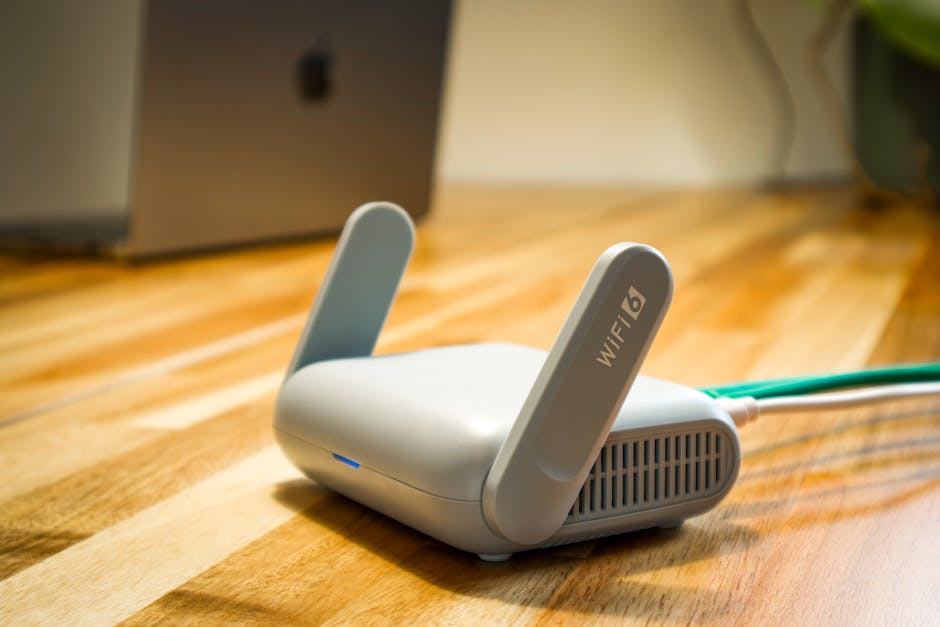
Here’s the useful part of the official Wi-Fi Alliance documentation, pulled apart from the claims a retailer listing would still have to back up. Read these figures as capabilities of the Wi-Fi 7 generation, not as measured speeds from any TP-Link router.
| Specification | Figures in the official documentation | What the figure means here |
|---|---|---|
| Generation | Wi-Fi 7, introduced in 2024 | The date describes the standard, not when a particular router went on sale. |
| Operating bands | 2.4 GHz, 5 GHz, and 6 GHz | The standard enhances performance across these bands. Confirm a specific router’s supported bands in its own specifications. |
| Wide channels | 320 MHz channels in the 6 GHz band | The Alliance says these provide twice the throughput of Wi-Fi 6. That is a standards comparison, not a household speed test. |
| Modulation | 4K QAM; 20% higher transmission rates than Wi-Fi 6’s 1024 QAM | A comparison of modulation modes, not a prediction of your internet speed. |
| Prior generation | Wi-Fi 6, introduced in 2018; added the 6 GHz band | 6 GHz itself is not new with Wi-Fi 7. The 320 MHz channels are the 6 GHz headline. |
That table is a decent shield against the usual box-copy sleight of hand. 320 MHz is a channel width, not a download speed. The 20% figure compares transmission rates for two modulation modes; it does not say every file moves 20% faster. And the 6 GHz reference tells you where the wide-channel capability lives (a band Wi-Fi 6 already opened up back in 2018). None of it confirms that the router in your cart, or the devices you’ll connect to it, supports the feature you care about.
Wi-Fi 7 is a sensible category to look at if your current network struggles with demanding wireless use. But “Wi-Fi 7” is the start of the spec sheet, not the end. Before you compare prices, pin down the exact TP-Link model, read its official specifications for bands and features, and check those against your own devices. Then look at the retailer listing and TP-Link’s support information for that model. Less exciting than a speed badge? Sure. Also far less likely to confuse a standard-level capability with a product-level fact.
What a TP-Link Listing Still Has to Prove
The source here covers Wi-Fi generations. It includes no TP-Link product page, model number, U.S. retailer listing, or FCC label. So it can’t confirm whether a given TP-Link router supports a particular band or channel width, what its ports offer, how its mesh setup works, or what it costs in USD. Don’t fill those blanks with assumptions just because the product name says “Wi-Fi 7.” Find the exact model and its documentation.
This matters if you’re a U.S. shopper comparing several listings that seem to describe the same class of router. A listing headline tells you what category the seller files the device under; it is not a substitute for the model’s actual specifications. If a feature is central to your decision, find it stated for that model. If you can’t, treat it as unknown (rather than quietly translating the Wi-Fi Alliance’s description into a TP-Link promise).
Confirmed Capabilities Versus Open Questions

| What the specs confirm | What the specs don’t tell you |
|---|---|
| Wi-Fi 7 enhances performance across 2.4 GHz, 5 GHz, and 6 GHz. | Which of those bands a specific TP-Link model supports. |
| 320 MHz channels are available in the 6 GHz band, according to the Wi-Fi Alliance. | Whether a particular router and your connected devices can use that channel width. |
| 4K QAM achieves 20% higher transmission rates than Wi-Fi 6’s 1024 QAM. | Your actual wireless speed or internet download speed. |
| The generation targets demanding uses, including AR/VR/XR and ultra-high-definition video streaming. | A specific router’s U.S. price, mesh features, password controls, or FCC label. |
Notice how many buying questions land in the right column. It’s what happens when you ask a standards page to do a product manual’s job. The Alliance describes the technology; model-specific documentation has to tell you what hardware you’re actually buying. If a seller can’t make that distinction clear, pause. Marketing gets very comfortable in that gap.
Speed, Mesh, and Price: Separate Decisions
“What wifi router is the fastest” sounds simple until you ask: fastest at what, with which device, measured by whom? The official source documents Wi-Fi 7 capabilities, including 320 MHz channels and 4K QAM. It provides no router tests and names no fastest TP-Link model. A standards figure is useful for checking whether a claimed feature makes technical sense. It is not a leaderboard.
A “wifi 7 router mesh” search adds another layer. Wi-Fi 7 describes the wireless technology; mesh describes how multiple networking units work together. The Wi-Fi Alliance excerpt does not cover TP-Link mesh products, setup steps, or compatibility between units. If whole-home coverage is why you’re shopping, verify the exact equipment and its documented mesh features instead of assuming the Wi-Fi 7 label answers that question. A newer wireless generation and a good multi-unit setup are not the same purchase.
“What is wifi router price” has no fixed answer here. The source includes no TP-Link price or U.S. retailer offer, so quoting a dollar figure would be guesswork. Compare the current USD price for the exact model against its official specifications, not against a generic description of Wi-Fi 7. A cheap listing with fuzzy model details isn’t automatically a bargain, and a pricey one doesn’t earn its tag just because the box shouts about the newest standard.
Keep / Skip / Wait
Verdict: Wait — the Wi-Fi 7 documentation explains the technology, but no model-specific TP-Link specs or price are available to justify a purchase.
Plainly: this verdict is based on specs and documentation, not on testing any router. It doesn’t mean every Wi-Fi 7 router is a poor choice. It means the evidence supports a clear explanation of the standard, while the decision about a particular TP-Link router still needs a model number, its official specifications, and a current U.S. listing. Know what the generation offers, then check what the hardware promises on paper.
FAQ
What is a Wi-Fi router, and what does Wi-Fi 7 change?
A Wi-Fi router connects devices wirelessly to a network. Wi-Fi 7 is a wireless generation that the Wi-Fi Alliance says enhances performance across 2.4 GHz, 5 GHz, and 6 GHz, with capabilities including 320 MHz channels in the 6 GHz band and 4K QAM.
What is a Wi-Fi router password?
It’s the credential used to join a protected wireless network. The Wi-Fi Alliance documentation does not provide a TP-Link router’s default password, setup instructions, or password-management steps. For a particular device, check its own label and official setup documentation rather than guessing from the Wi-Fi 7 name.
Does a Wi-Fi 7 TP-Link router need to be a mesh router?
The Wi-Fi 7 documentation sets no mesh requirement. It describes the wireless generation, not how a particular TP-Link product is configured. If you need mesh, check the exact model’s documented features and which units are meant to work together before ordering.
Will Wi-Fi 7 make my internet connection faster?
The official documentation describes potential wireless improvements, including wider 6 GHz channels and a higher-rate modulation mode. It does not measure your connection or promise a result for any TP-Link router. Check the model’s supported features first, and keep its wireless specs separate from claims about your internet service.
Related on Longview Desk
This article was written by the site’s author with the assistance of AI tools, and reviewed before publication.