At a glance
- What it is: A WiFi 7 router modem combo puts modem and Wi-Fi router functions in a single home gateway.
- What’s new: Wi-Fi CERTIFIED 7 adds 320 MHz channels in the 6 GHz band.
- Who it is for: Households that want one box for internet access and home Wi-Fi.
Do you need a WiFi 7 router modem combo, or is a separate modem and router still the less annoying setup? A combo is basically a gateway. One box takes the connection from your internet provider and hands it out to your devices over Wi-Fi. That answers the basic “what is wifi router and modem” question. It doesn’t tell you whether a given box will work with your U.S. provider. (Spoiler: that’s the part that matters most.) This piece is based on published specs and official documentation only. No device was tested for it.
What a WiFi 7 Router Modem Combo Actually Does
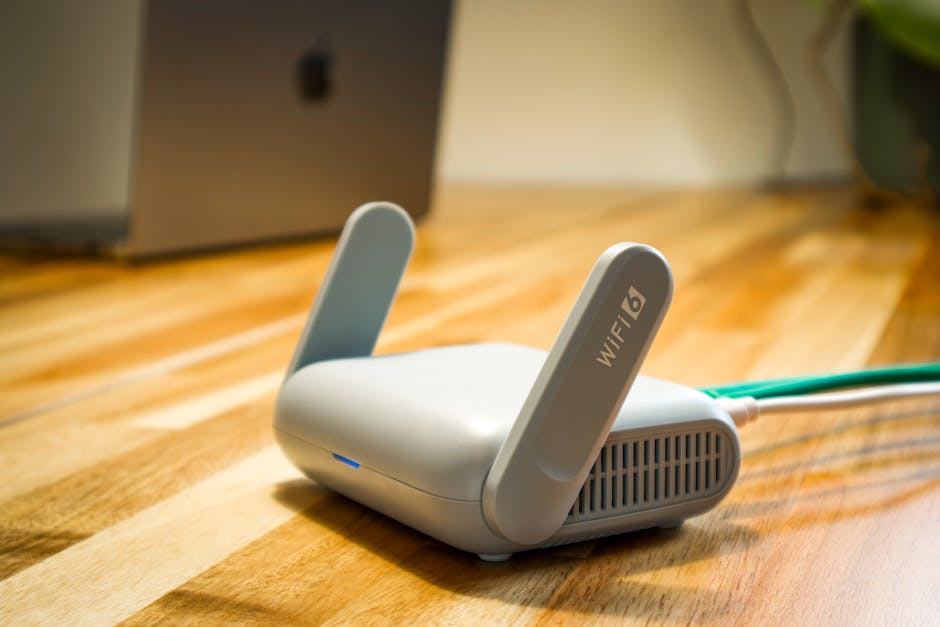
A modem and a router do different jobs. The modem connects your home to the provider’s service. The router builds the local network that your phones, laptops, TVs and smart-home gear join. Put both in one case and you get the familiar provider-gateway idea. The difference is that the Wi-Fi side may now support Wi-Fi CERTIFIED 7.
So what is a Wi-Fi router, and how does it work? It moves traffic between devices on your local network and out to the internet connection. A box with a built-in modem also handles the connection to the provider. A WiFi 7 router modem combo tidies that arrangement up: less hardware, fewer power outlets and usually one admin interface. (“Usually” is doing real work in that sentence.) The exact setup, whether your provider approves the box and which settings you get all depend on the device and the provider.
Wi-Fi CERTIFIED 7 is the Wi-Fi Alliance certification program for this generation of Wi-Fi. The alliance says it adds features meant to improve performance and connectivity in many kinds of environments. Its material highlights high speeds, deterministic low latency, more capacity and less interference. Those are things the Wi-Fi system can do. They are not a promise that every household gets the same result.
Spec Teardown
| Specification | What official documentation says | Figures / numbers |
|---|---|---|
| Certification generation | Wi-Fi CERTIFIED 7 is the Wi-Fi Alliance certification program that follows Wi-Fi CERTIFIED 6. | 7 (follows 6) |
| Wide channels | 320 MHz channels are available in the 6 GHz band. | 320 MHz; 6 GHz |
| Throughput vs. Wi-Fi 6 | The alliance says 320 MHz channels provide twice the throughput of Wi-Fi 6. | 2x Wi-Fi 6 (per the alliance) |
| Performance claims | High speeds and deterministic, low latency across a wide range of signal conditions. Also expanded capacity and reduced interference. | Multi-gigabit per second device speeds |
| Device scope | The alliance has extended Wi-Fi CERTIFIED 7 to 20 MHz-only devices. | 20 MHz |
| Market context | The alliance tracks 6 GHz chipset shipments in 2026 across Wi-Fi 6E and tri-band Wi-Fi 7. | 6 GHz; 2026 |
The useful headline is not “Wi-Fi 7 is faster.” (Marketing departments have that one covered, thanks.) The useful headline is that Wi-Fi CERTIFIED 7 can use 320 MHz channels in the 6 GHz band, and the Wi-Fi Alliance says those channels deliver twice the throughput of Wi-Fi 6. That’s a specific technical advantage. It isn’t a verdict on every router, every client device or every internet plan.
A Wi-Fi 7 router also doesn’t automatically give you a Wi-Fi 7 experience. The device on the other end matters. The alliance’s material is about Wi-Fi CERTIFIED 7 devices and the 6 GHz band. It doesn’t say an older phone, laptop or adapter picks up Wi-Fi 7 features just because you swapped the router. That’s the practical answer to “what is wifi router and adapter”: the router creates the network, and the adapter in each device decides which of that network’s features the device can actually use.
One more detail: the alliance has extended Wi-Fi CERTIFIED 7 to 20 MHz-only devices. That points to simpler, narrow-channel gear (think connected gadgets rather than laptops) being part of the same certification. So a “Wi-Fi 7” logo on a product doesn’t, on its own, mean that product uses 320 MHz channels. Read the spec sheet, not the box art.
Setup Is the Boring Part That Decides Everything

With a combined modem-router, provider compatibility comes before any Wi-Fi feature. A router can have great local-network specs and still be the wrong hardware if your provider won’t accept the modem side. The Wi-Fi Alliance documentation covers certification and radio capabilities. It doesn’t include a provider compatibility list, prices in USD, rental terms or activation steps for cable, fiber or fixed-wireless service.
That matters in the U.S., where your provider may supply its own gateway, require a particular connection method or publish its own equipment rules. Check those rules before you go down the “wifi 7 router scp” rabbit hole. The Wi-Fi Alliance material doesn’t define that term. It may show up in shopping listings or search results, but the answer has to come from the maker’s and provider’s documentation, not a listing title.
Here’s the order of operations I’d follow. Each step can rule a box out before the next one matters.
What the Specs Confirm—and What They Leave Out
| What the specs confirm | What the specs don’t tell you |
|---|---|
| Wi-Fi CERTIFIED 7 includes 320 MHz channels in the 6 GHz band. | Whether your internet provider accepts a particular combo device. |
| The Wi-Fi Alliance describes expanded capacity, reduced interference and multi-gigabit per second device speeds. | What speeds your internet plan or your individual devices will actually deliver. |
| Wi-Fi CERTIFIED 7 has been extended to 20 MHz-only devices. | Whether every phone, laptop or adapter you own can use the wide-channel features. |
| The alliance describes deterministic, low latency across a range of signal conditions. | How your walls, mix of devices and service connection will affect real-world performance. |
A clean spec sheet is not a buying decision. The Wi-Fi Alliance confirms real capability at the Wi-Fi layer. It doesn’t confirm modem compatibility, provider activation, whole-home coverage or management features. It also doesn’t tell you how any specific Wi-Fi 7 router from Asus or another brand behaves. That takes documentation from the device maker and your internet provider, and neither is in the source material behind this piece.
Combo Gateway or Separate Hardware?
A combo makes sense when your provider supports it and you want a simpler setup. One device is easier to place, power and manage. Separate hardware still has a practical appeal, though. The provider connection and the Wi-Fi network are different jobs. Keep them in separate boxes and you can upgrade the Wi-Fi later without touching the provider side, and vice versa.
If you’re renting a provider gateway today and your devices are mostly older, the 320 MHz headline won’t do much for you yet. If your household already has newer Wi-Fi 7 phones and laptops, the spec story gets more interesting, but only after the provider question is settled.
The documentation doesn’t show that one arrangement is always better. It does show that Wi-Fi CERTIFIED 7 adds wide-channel capability over Wi-Fi 6, including 320 MHz channels in 6 GHz. The catch is simple: you need compatible service, compatible hardware and compatible client devices before those specs matter at home.
Keep / Skip / Wait
Verdict: Wait — Wi-Fi CERTIFIED 7 has real, documented capability, but nothing here confirms provider compatibility or model-specific combo support, so get those answers first.
FAQ
What is a WiFi 7 router modem combo?
It’s a single device that combines the modem’s job (connecting to your provider) with the router’s job (running your local network) and supports Wi-Fi 7. Wi-Fi CERTIFIED 7 is the Wi-Fi Alliance certification program that covers the Wi-Fi side.
Does Wi-Fi 7 mean every device gets faster internet?
The official material makes no such promise. The Wi-Fi Alliance describes what Wi-Fi 7 can do, including 320 MHz channels in 6 GHz and multi-gigabit device speeds. It doesn’t say every device, home or internet plan will get the same result.
What is the main Wi-Fi 7 benefit in the official documentation?
The clearest spec is 320 MHz channels in the 6 GHz band. The Wi-Fi Alliance says those channels provide twice the throughput of Wi-Fi 6, along with more capacity and less interference.
Should I look for a Wi-Fi 7 router from Asus?
Only after you’ve confirmed the device type fits your internet service. The Wi-Fi Alliance material doesn’t cover any specific Asus product, provider approval or modem compatibility. Start with your provider’s equipment requirements, then compare the maker’s documentation.
Related on Longview Desk
This article was written by the site’s author with the assistance of AI tools, and reviewed before publication.