At a glance
- What it is: Wi-Fi 7 is a Wi-Fi generation introduced in 2024.
- What’s new: It works across the 2.4 GHz, 5 GHz, and 6 GHz bands, with 320 MHz channels in 6 GHz.
- Who it is for: It targets demanding uses such as ultra-high-definition streaming and AR/VR/XR.
Will a WiFi 7 router Spectrum setup actually improve your home network, or is the label doing more work than the hardware? Short answer: Wi-Fi 7 describes the wireless link inside your home. Your internet equipment and your service setup are separate questions. A router can be excellent at moving traffic between local devices and still tell you nothing about whether it replaces provider equipment. (Marketing pages love blurring that line.)
This article is based on specifications and documentation, not hands-on testing. The official Wi-Fi Alliance Wi-Fi CERTIFIED 7 overview says what Wi-Fi 7 can do at the Wi-Fi layer. It does not cover Spectrum compatibility, approved equipment, activation steps, U.S. retail pricing, or real in-home performance. So the honest answer to “wifi 7 router spectrum” has two parts, and only one of them comes from the spec sheet.
What a WiFi 7 Router Spectrum Search Is Really Asking
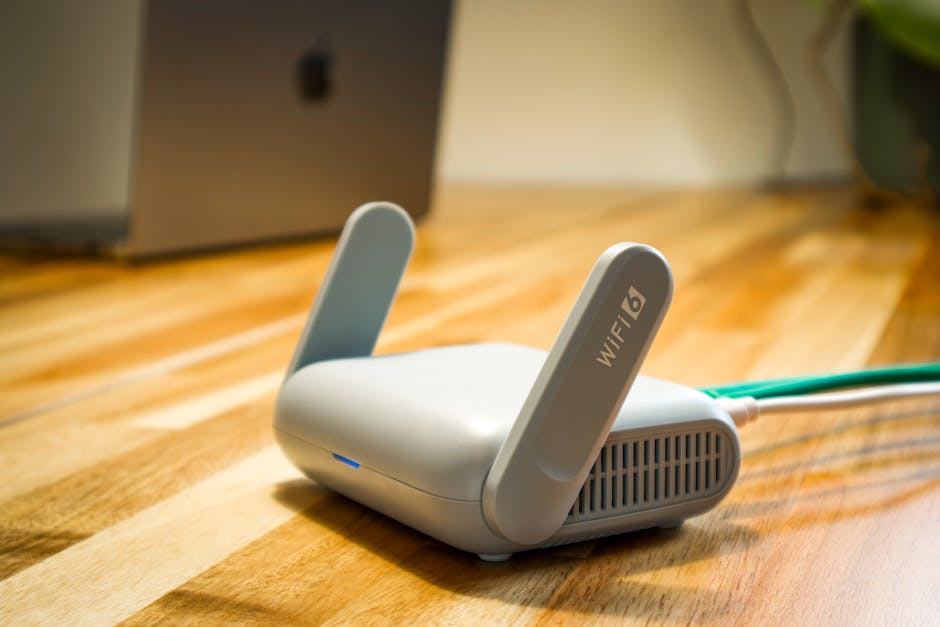
First, what is a Wi-Fi router? It’s the box that connects your devices to each other and to your internet connection over Wi-Fi. Wi-Fi 7 is the generation of that wireless connection. Per the Wi-Fi Alliance, Wi-Fi 7 was introduced in 2024 and improves performance across the 2.4 GHz, 5 GHz, and 6 GHz bands.
So what is a Wi-Fi router and modem, then? They do different jobs. The source documentation covers Wi-Fi capabilities. It says nothing about modem functions, provider certification, or Spectrum’s hardware policies. That means the “Wi-Fi 7” label doesn’t settle the “wifi 7 router modem combo” question. It tells you about Wi-Fi capability. It doesn’t tell you whether a device can work as the modem for a particular U.S. cable provider.
For a U.S. household, that leaves a simple split. First, figure out which equipment provides the internet connection. Then check whether the router and your devices can use the Wi-Fi bands and features on offer. A Wi-Fi 7 badge is not a provider-approval badge. That’s obvious once you say it, but it’s exactly where shopping-cart logic tends to fall apart.
Spec Teardown
| Specification | What official documentation says | Figures / numbers |
|---|---|---|
| Generation | Wi-Fi CERTIFIED 7 was introduced in 2024. | 2024 |
| Supported bands | Wi-Fi 7 improves performance across the 2.4 GHz, 5 GHz, and 6 GHz bands. | 2.4 GHz; 5 GHz; 6 GHz |
| Wide channels | 320 MHz channels are available in the 6 GHz band. | 320 MHz; 6 GHz |
| Throughput | Those 320 MHz channels provide twice the throughput of Wi-Fi 6, enabling multigigabit device speeds. | Twice Wi-Fi 6 |
| Modulation | 4K QAM delivers 20% higher transmission rates than Wi-Fi 6’s 1024 QAM. | 4K QAM; 20%; 1024 QAM |
| Named use cases | AR/VR/XR, immersive 3D training, and ultra-high-definition video streaming. | 3D |
Here’s the useful part of that table. Wi-Fi 7 adds tools for capacity, and they matter most when your local wireless network is the bottleneck. Think lots of active devices, demanding wireless apps, or newer gear that can actually reach the 6 GHz band. The Wi-Fi Alliance specifically promises higher throughput, lower latency, and greater reliability for demanding applications.
The less useful reading is “Wi-Fi 7 makes every internet plan faster.” The documentation never says that. Features like 320 MHz channels and 4K QAM depend on a compatible Wi-Fi environment. They don’t guarantee a result on every device, in every room, or over every provider connection.
What the Specs Confirm, and What They Don’t

| What the specs confirm | What the specs don’t tell you |
|---|---|
| Wi-Fi 7 operates across 2.4 GHz, 5 GHz, and 6 GHz. | Whether a given Spectrum setup supports a particular router or modem arrangement. |
| 320 MHz channels are available in the 6 GHz band. | Whether your phone, laptop, or streaming box can use those channels. |
| 4K QAM gives 20% higher transmission rates than Wi-Fi 6’s 1024 QAM. | What rate you’ll actually see in a real room or on your internet plan. |
| Wi-Fi 7 targets demanding apps such as ultra-high-definition streaming and AR/VR/XR. | Whether any specific app will perform better in your home. |
The no-nonsense version: the specs set a ceiling on features, not a forecast for your living room. A new router may offer three bands on paper while an older phone, laptop, or smart-home gadget runs on a different band or an earlier Wi-Fi generation. The source documentation includes no device-compatibility list, so claiming a universal benefit would be fiction.
As for “wifi 7 router scp”: that term doesn’t appear in the official Wi-Fi Alliance material, so don’t treat it as a Wi-Fi feature. Stick to the questions that matter. Which bands and Wi-Fi generation does the router support? What can your devices use? What does your internet provider’s setup require?
How the Decision Flow Works
Start by separating your internet access equipment from your local Wi-Fi. Then compare what the router offers with what your devices can actually use. The official documentation supports the Wi-Fi part of that chain. Provider approval and activation details have to come from the provider.
That order is deliberately boring, and boring keeps you from buying a headline feature before checking whether the rest of your setup can use it. If the draw is 6 GHz and 320 MHz channels, “does the router say Wi-Fi 7?” isn’t enough. You need to know whether your devices support those capabilities. The Wi-Fi Alliance overview doesn’t list qualifying devices, so check each device maker’s official specs rather than a retailer’s catch-all “compatible” line.
Wi-Fi 7 Versus Earlier (and Later) Generations
According to the Wi-Fi Alliance, Wi-Fi 6 arrived in 2018 with higher data rates, greater capacity, better performance in crowded places, and improved power efficiency. It also brought Wi-Fi into the 6 GHz band, alongside the 2.4 GHz and 5 GHz bands. Wi-Fi 5, introduced in 2014, offered higher capacity, better power management, lower latency, and multi-gigabit-per-second data rates.
Two side notes from the same source. Wi-Fi HaLow, introduced in 2017, runs in sub-1 GHz spectrum for range of roughly 0.6 mile (1 km) and strong wall penetration. That’s a different tool from a home Wi-Fi 7 router. And the Alliance already describes Wi-Fi 8 as the next generation, focused on reliability. (So “newest” has a shelf life.)
That’s the context that matters: “newest” isn’t the same as “necessary.” Wi-Fi 7’s documented advantages are real. But if your active devices don’t support them, the router still works as a router, just without every advertised benefit reaching every device. No brochure can negotiate around that.
Keep / Skip / Wait
If you’re deciding based on Spectrum modem approval or guaranteed speed gains, the official Wi-Fi documentation doesn’t settle either one. I’d confirm provider requirements and device support first.
Verdict: Wait — The Wi-Fi 7 specs are strong, but they don’t confirm a Spectrum equipment match or a better result in your home.
FAQ
What is a WiFi 7 router?
It’s a router that uses Wi-Fi 7 for local wireless networking. Per the Wi-Fi Alliance, Wi-Fi 7 improves performance across the 2.4 GHz, 5 GHz, and 6 GHz bands and supports 320 MHz channels in 6 GHz.
Is a WiFi 7 router the same as a modem?
The Wi-Fi 7 documentation doesn’t answer that. Wi-Fi 7 describes wireless networking features. It doesn’t cover modem functions, Spectrum approval, or whether any router can replace your modem.
What is a WiFi router and how does it work at home?
A router gives your devices a local network connection over Wi-Fi. With Wi-Fi 7, compatible devices can use the 2.4 GHz, 5 GHz, or 6 GHz bands. Real performance depends on your whole setup, and the official material doesn’t promise any specific household result.
Does Wi-Fi 7 make Spectrum internet faster?
Not necessarily. The Wi-Fi Alliance describes higher throughput, lower latency, and greater reliability at the Wi-Fi layer. It doesn’t promise a particular internet speed, provider compatibility, or performance outcome.
This article was written by the site’s author with the assistance of AI tools, and reviewed before publication.